Task

How to organize your tasks in 1 week
Clutter in tasks appears gradually. Initially, it is a few tasks without deadlines, then messages in chats, notes in notebooks, and requests "not to forget". After some time, the team no longer understands what is truly important, which tasks are being executed, and which are stuck without progress.
As a result, employees are constantly busy, but efficiency does not increase. Some tasks get lost, deadlines are postponed, and the manager is forced to spend time on constant monitoring and clarification.
In reality, bringing order does not require months of rebuilding processes. If the team is ready to work systematically, basic order in tasks can be established in just one week. The main thing is not to try to create an ideal system right away, but to start with simple and clear changes.
In Keruy™ (Керуй), ready-made tools for this are already available: projects, tasks, statuses, dashboards, and internal communication. They help gradually transform a chaotic task list into a clear working system.
Day 1. Gather all tasks in one place
The first step is to stop storing tasks in different places. If part of the work is in messengers, part in Excel, and another part in the memory of employees, it is practically impossible to control the process.
At the start, it is enough just to move all actual tasks into a single space. You don't need to build a complex structure or create dozens of statuses right away. The main task of the first day is to make the work transparent.
In Keruy™ (Керуй), tasks can be created both separately and within projects. This allows you to see all the team's work in one environment and quickly find the necessary information.
When transferring tasks, it is important to immediately remove duplicates, outdated entries, and tasks without a specific action. After this, the team usually notices that part of the chaos arose precisely from overloading with unnecessary information.
Day 2. Define task statuses
When all tasks are collected in one place, the next problem arises - it is unclear what stage the work is at.
Some tasks are already completed but not closed. Others have not yet started. Some are stuck waiting for approval or a client's response. Without clear statuses, the team does not see the real picture.
To start with, a few basic statuses are enough:
Planned
Pending
In Progress
Blocked
Completed
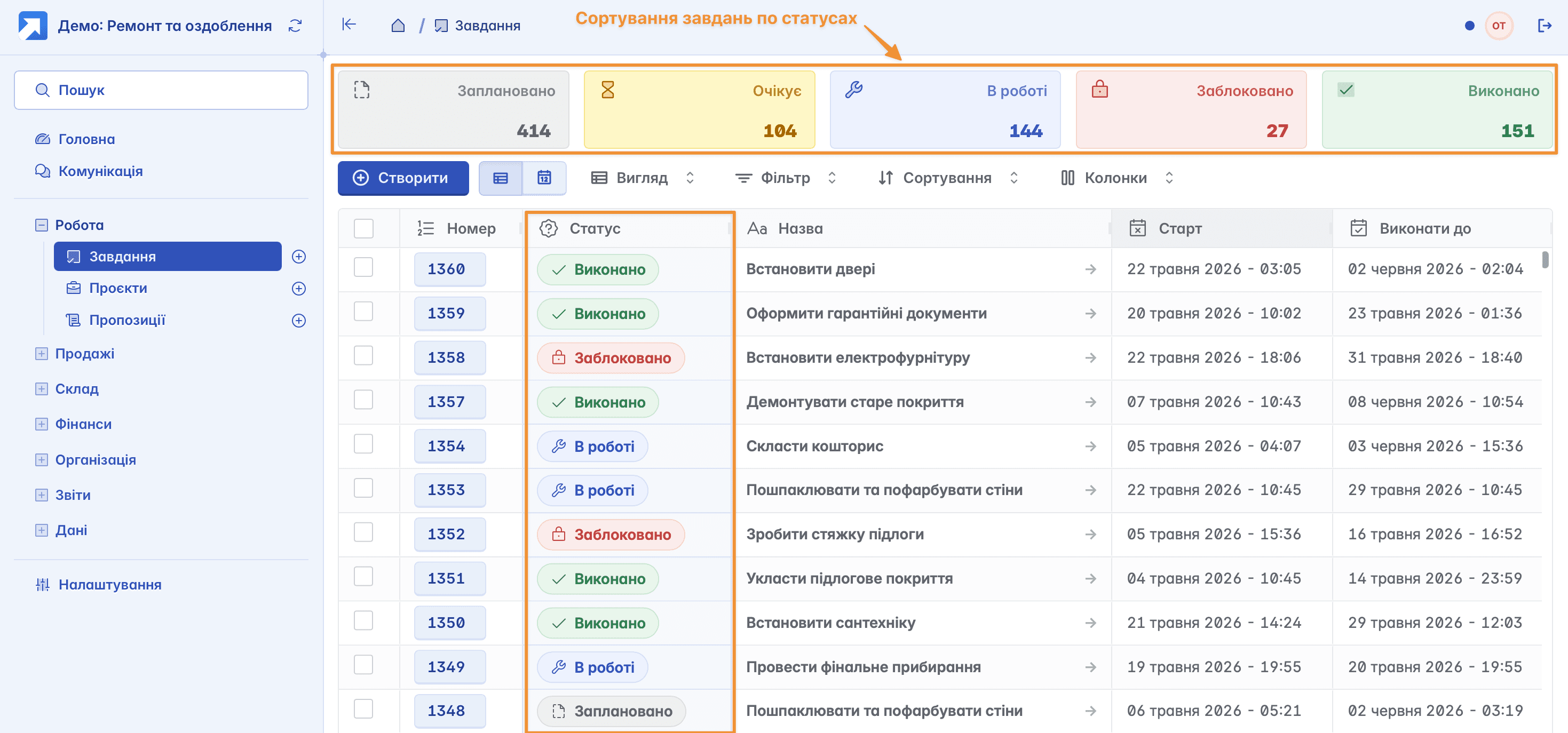
This produces a very simple but important effect - the team begins to see the movement of work. The manager no longer spends time on constant clarifications, and employees better understand their own workload.
Day 3. Determine deadlines, delivery dates and reminders
Another common cause of chaos is tasks without clear deadlines. If an employee does not understand exactly when the work needs to be completed, the task is constantly postponed due to more "urgent" matters.
That is why at the third stage it is important to review all active tasks and set deadlines for them. Even an approximate deadline significantly improves planning and helps the team distribute the workload correctly.
In Keruy™ (Керуй), you can set a due date for each task, as well as use reminders to not miss important deadlines. This allows employees to better monitor their own work, and managers to timely see tasks that risk being overdue.
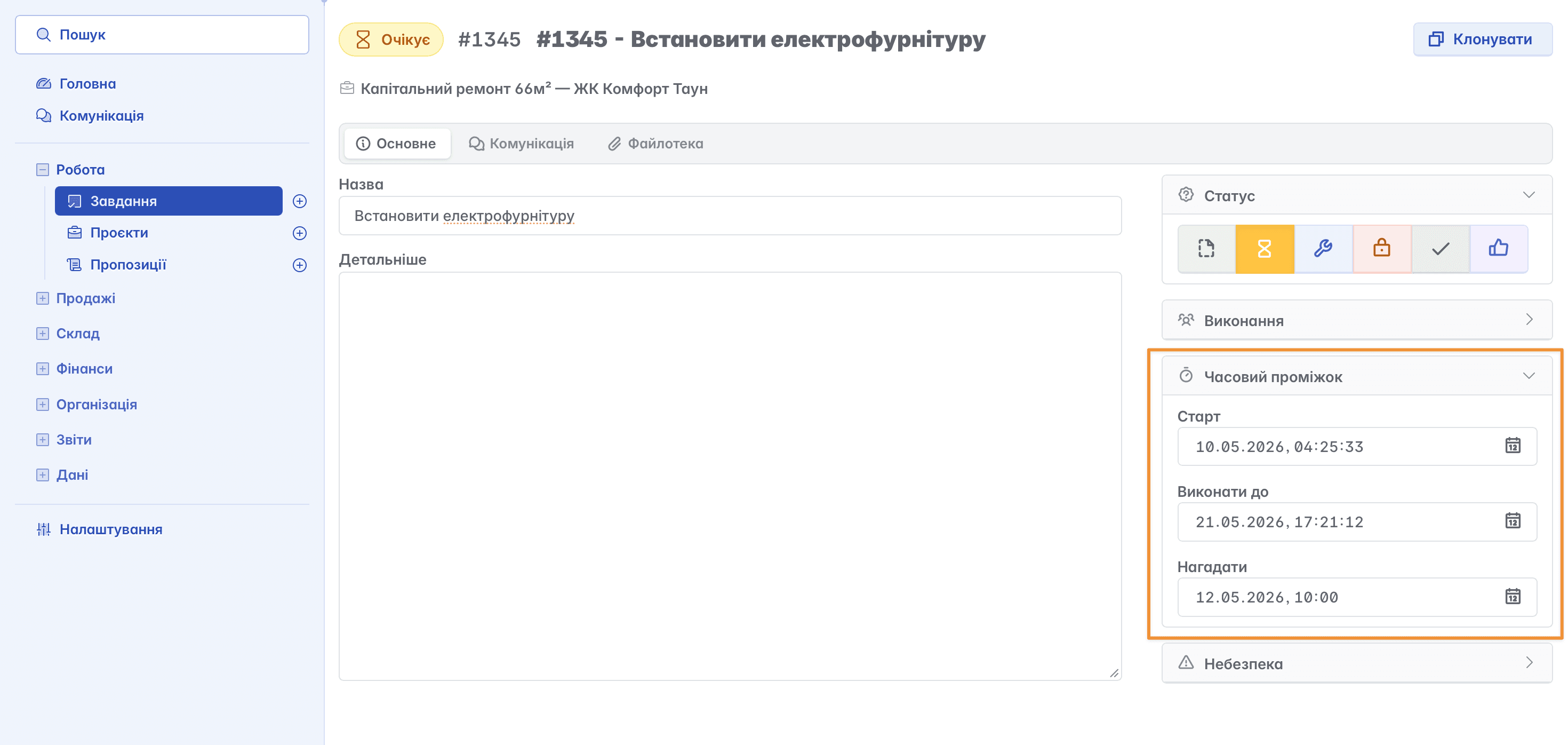
When the team works with clear deadlines, the process becomes more predictable. The number of emergency tasks decreases, and employees can plan their workday without constant chaos and rush.
Day 4. Assign responsibility
Tasks without an assignee almost always remain unfinished or are constantly postponed.
A common mistake is assigning tasks "to the team" or "to the department." In this case, no one feels personal responsibility for the result.
Each task must have a specific assignee. Even if several people are working on it.
In Keruy™ (Керуй), all tasks are assigned to specific authors and responsible persons. This simplifies workload control and allows you to quickly see who is overloaded and who has free capacity.
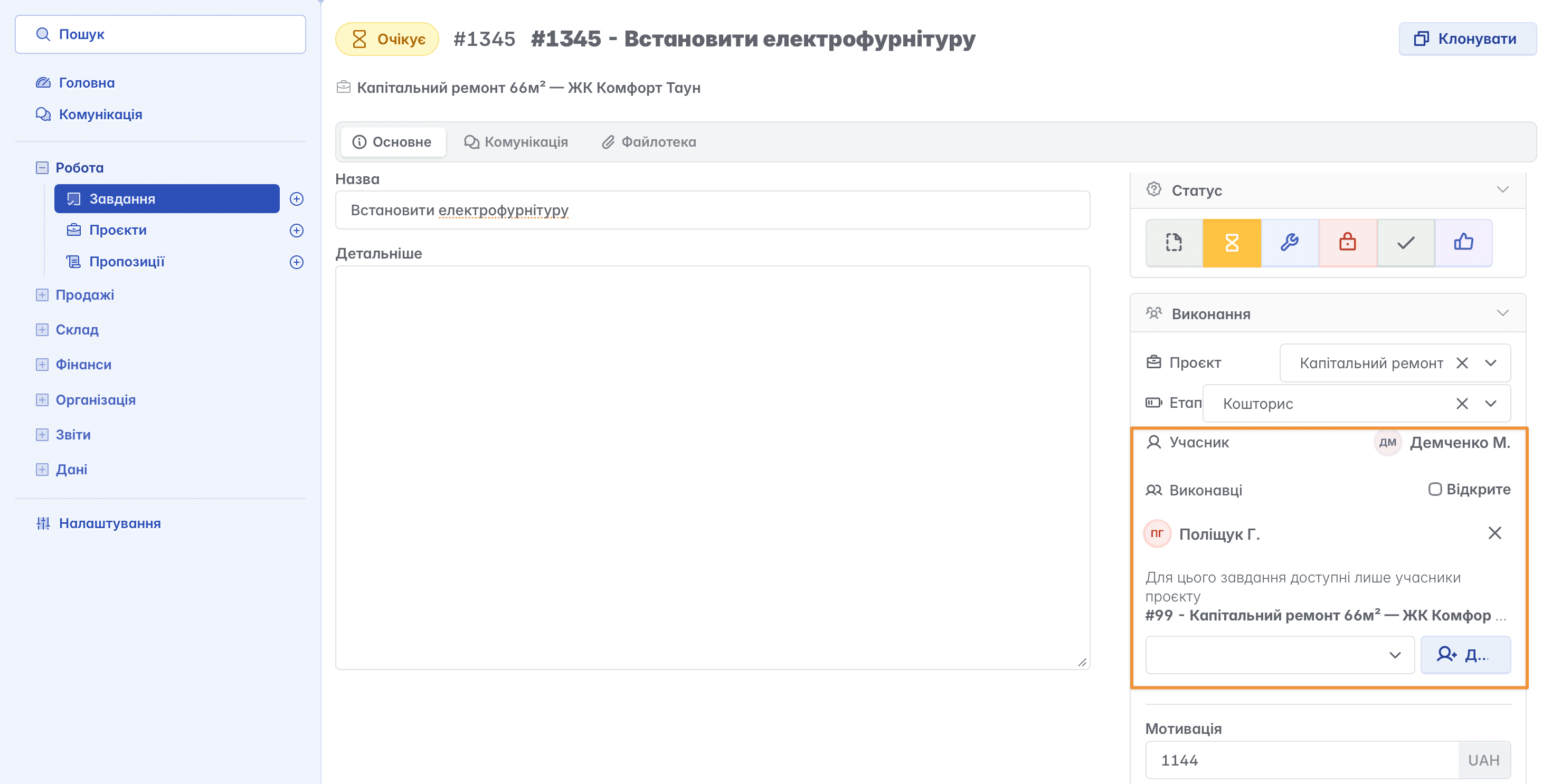
At this stage, managers often notice another problem - uneven workload distribution. Some employees are overloaded, while others do not have enough work. This realization alone helps to organize the team's work much better.
Day 5. Move communication into tasks
Another cause of disorder is information scattered across various chats and calls.
When discussion takes place in messengers, employees are constantly searching for details, clarifying agreements, and asking each other again. This takes up a lot of time and creates confusion.
It is much more effective when all communication is conducted directly inside the task.
In Keruy™ (Керуй), you can leave comments, track changes, and see the task's work history. Thanks to this, a new team member quickly understands the context, and important information does not get lost among messages.
In addition, this significantly reduces the number of internal clarifications and makes processes more transparent for the entire team.
Day 6. Document the rules of work
After a week of work, the team already begins to see what exactly created the biggest chaos. For some, it is tasks without deadlines; for others, it is the lack of assignees or communication in different chats.
But the main thing is not just to sort out the current mess, but to lock in new rules of work.
If the team goes back to old habits, chaos will return very quickly. That is why it is important to agree on basic principles:
all tasks are created in the service
each task has an assignee and a deadline
key communication is conducted within the task
Order in tasks is not about complex management or constant control. It is about a clear system where everyone sees their tasks, priorities, and responsibility.
These are precisely the processes that allow the team to work faster, calmer, and more efficiently without constant chaos and the loss of important information.