Інтеграції
Prozorro
Prozorro is a state public procurement system that provides open access to information about tenders
Integration with Keruj allows you to automatically find tenders according to specified criteria, create opportunities for them in the CRM, and synchronize all important changes. This makes it possible to work with tenders directly in Keruj without wasting time on constant monitoring of the Prozorro website
Location
The tool for configuring integrations is located in the navigation bar on the left, under the "Settings" section, in the "Automation" block

Adding
You can add a new integration by clicking the "+ Add" button on the main page. In the window with the list of available integrations, select "Prozorro" and click the "Connect" button

Form for configuring integration

CPV codes - search by procurement categories (Current CPV)
Keywords - search by words in the title or description of the tender
Regions - restriction of search by regions
Minimum expected value - selection of tenders starting from the specified amount
Maximum expected value - selection of tenders up to the specified amount
Exclude CPV codes - ignoring certain categories (Irrelevant CPV)
Exclude keywords - ignoring unwanted tenders
Procedure type - filter by procurement type (simplified procurement, open bidding, etc.)
Customers by USREOU code - search for tenders of specific customers
The more search criteria you configure, the more accurately Keruj will select tenders that meet your needs. If the field is left empty, restrictions for filtering by this parameter will not apply
After clicking the "Next" button, the next form will open, in which data import to Keruj is configured
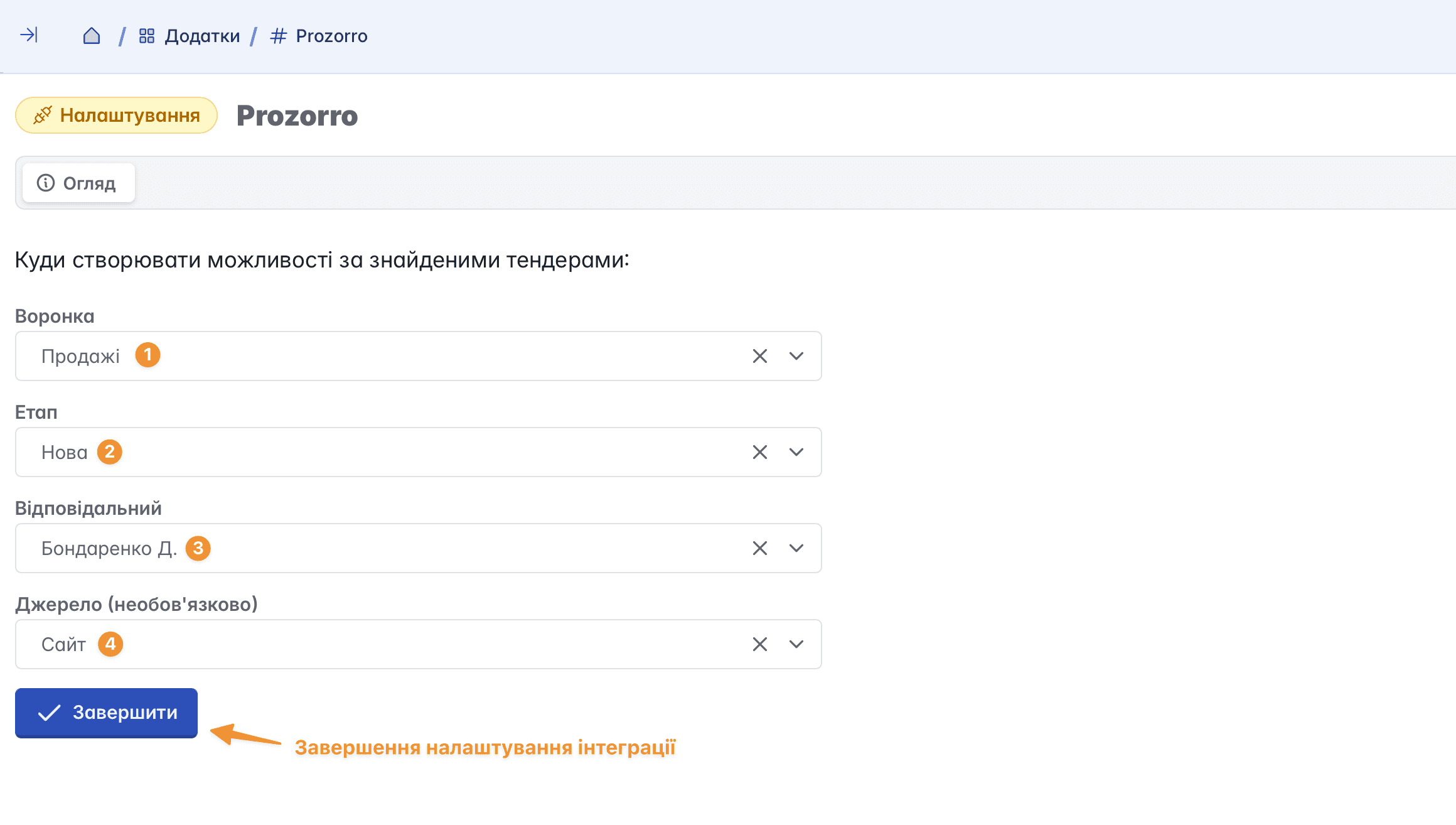
Pipeline - a tool for grouping and filtering opportunities. We recommend creating a separate pipeline for tenders to separate them from other records
Stage - the status that will be automatically assigned to each new opportunity created through integration
Responsible - the employee who will be automatically assigned as responsible for all new opportunities
Source - the origin source of the record. Filling this field is optional
After completing the setup, Keruj will automatically import tenders that match the specified criteria. If necessary, you can run a manual synchronization at any time by clicking the "Sync now" button

Working with opportunities
All procurements that meet the specified criteria are automatically created by the service as opportunities
If a separate pipeline was created for tenders during integration setup, select it in the "Process" filter (for example, switch from "Sales" to "Tenders") to view imported records

The opportunity card is automatically populated with data from the tender. You can track all changes in it, and after winning the bidding, convert the opportunity into a project or document. This allows you to continue working without duplicating information and maintain the link to the original source

Removing integration
If the integration is no longer needed, provided you have the appropriate permissions and access rights, it can be "Disconnected"

Disconnecting the integration stops synchronization and data updates. At the same time, all records that were imported earlier will remain in Keruj
Related articles