Synchronization
Data synchronization between different systems is always a challenge for a developer, as building a reliable ETL is time-consuming and not always convenient. You always need to monitor the "source of truth" and store record identifiers in adjacent systems for a future upsert strategy (update or insert).
remoteId
Keruj, at the architectural level, adds such a convenient remoteId field to its main entities via the API
This is the data identifier from your "source of truth". It is optional, but if you pass it, the value must be unique.
remoteId allows you to use it for subsequent exchanges during data synchronization. Thanks to this, you do not need to store the id value from Keruj on your end to synchronize data in Keruj.
Upsert mutations
In addition to the standard create/update/delete mutations, the Keruj API also has separate upsert mutations that allow you to synchronize data more easily. They work on the principle of update or insert. That is, you simply call the upsert mutation you need with the necessary identifier or your remoteId, and Keruj itself will decide whether this record needs to be created or updated. Currently, our API provides the following upsert mutations
upsertItem
upsertAddress
upsertLocation
upsertContragent
upsertDocument
upsertDocumentItem
upsertTaxon
Example with nomenclature
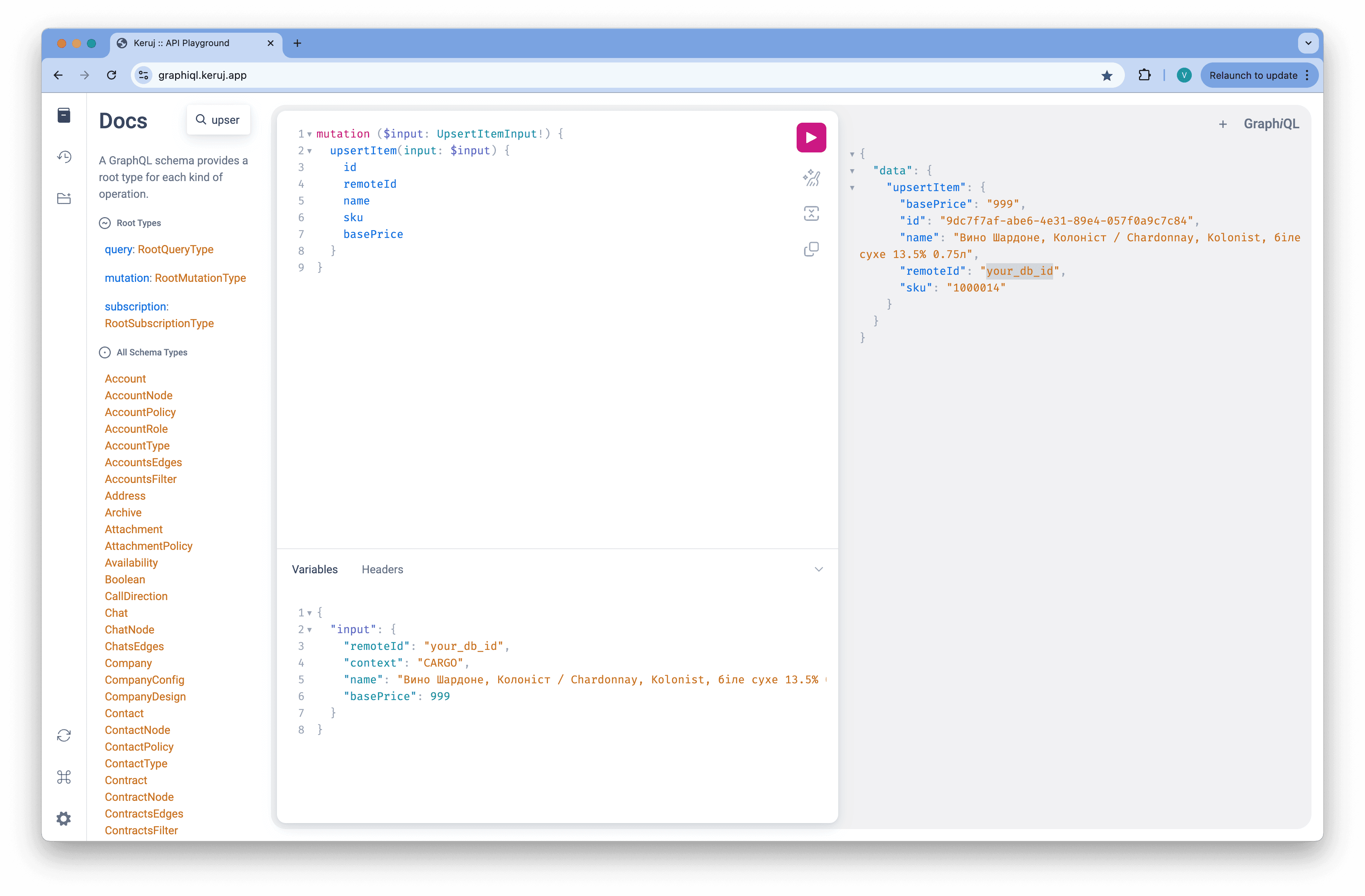
For example, let's take the synchronization of nomenclature from your DB to Keruj.
Request
mutation ($input: UpsertItemInput!) {
  upsertItem(input: $input) {
    id
    remoteId
    name
    sku
    basePrice
  }
}
mutation ($input: UpsertItemInput!) {
upsertItem(input: $input) {
id
remoteId
name
sku
basePrice
}
}mutation ($input: UpsertItemInput!) {
upsertItem(input: $input) {
id
remoteId
name
sku
basePrice
}
}Variables
{
  "input": {
    "remoteId": "your_db_id",
    "context": "CARGO",
    "name": "Вино Шардоне, Колоніст / Chardonnay, Kolonist, біле сухе 13.5% 0.75л",
    "basePrice": 999
  }
}
{
"input": {
"remoteId": "your_db_id",
"context": "CARGO",
"name": "Вино Шардоне, Колоніст / Chardonnay, Kolonist, біле сухе 13.5% 0.75л",
"basePrice": 999
}
}{
"input": {
"remoteId": "your_db_id",
"context": "CARGO",
"name": "Вино Шардоне, Колоніст / Chardonnay, Kolonist, біле сухе 13.5% 0.75л",
"basePrice": 999
}
}Response
{
  "data": {
    "upsertItem": {
      "basePrice": "999",
      "id": "9dc7f7af-abe6-4e31-89e4-057f0a9c7c84",
      "name": "Вино Шардоне, Колоніст / Chardonnay, Kolonist, біле сухе 13.5% 0.75л",
      "remoteId": "your_db_id",
      "sku": "1000014"
    }
  }
}
{
"data": {
"upsertItem": {
"basePrice": "999",
"id": "9dc7f7af-abe6-4e31-89e4-057f0a9c7c84",
"name": "Вино Шардоне, Колоніст / Chardonnay, Kolonist, біле сухе 13.5% 0.75л",
"remoteId": "your_db_id",
"sku": "1000014"
}
}
}{
"data": {
"upsertItem": {
"basePrice": "999",
"id": "9dc7f7af-abe6-4e31-89e4-057f0a9c7c84",
"name": "Вино Шардоне, Колоніст / Chardonnay, Kolonist, біле сухе 13.5% 0.75л",
"remoteId": "your_db_id",
"sku": "1000014"
}
}
}Keruj in this case used the value of your remoteId and created the corresponding record in the nomenclature table. ID and SKU were generated automatically, but remoteId can be used for subsequent data exchanges.
For example, the price of a product has changed, and you pass the same mutation but with different variables (basePrice has changed)
Request
{
  "input": {
    "remoteId": "your_db_id",
    "context": "CARGO",
    "name": "Вино Шардоне, Колоніст / Chardonnay, Kolonist, біле сухе 13.5% 0.75л",
    "basePrice": 699
  }
}
{
"input": {
"remoteId": "your_db_id",
"context": "CARGO",
"name": "Вино Шардоне, Колоніст / Chardonnay, Kolonist, біле сухе 13.5% 0.75л",
"basePrice": 699
}
}{
"input": {
"remoteId": "your_db_id",
"context": "CARGO",
"name": "Вино Шардоне, Колоніст / Chardonnay, Kolonist, біле сухе 13.5% 0.75л",
"basePrice": 699
}
}Response
{
  "data": {
    "upsertItem": {
      "basePrice": "699",
      "id": "9dc7f7af-abe6-4e31-89e4-057f0a9c7c84",
      "name": "Вино Шардоне, Колоніст / Chardonnay, Kolonist, біле сухе 13.5% 0.75л",
      "remoteId": "your_db_id",
      "sku": "1000014"
    }
  }
}
{
"data": {
"upsertItem": {
"basePrice": "699",
"id": "9dc7f7af-abe6-4e31-89e4-057f0a9c7c84",
"name": "Вино Шардоне, Колоніст / Chardonnay, Kolonist, біле сухе 13.5% 0.75л",
"remoteId": "your_db_id",
"sku": "1000014"
}
}
}{
"data": {
"upsertItem": {
"basePrice": "699",
"id": "9dc7f7af-abe6-4e31-89e4-057f0a9c7c84",
"name": "Вино Шардоне, Колоніст / Chardonnay, Kolonist, біле сухе 13.5% 0.75л",
"remoteId": "your_db_id",
"sku": "1000014"
}
}
}As you can see, the record was updated with the new price value
Identifier priorities
For upsert mutations, the priority of identifiers is very important. If you decide to pass id and remoteId in 1 request, the main synchronization key will be id
You can learn more about identifier priorities in the annotations for the API documentation of each individual upsert mutation